Adobe Premiere is becoming significantly more AI-powered in 2026. The latest Premiere update adds tools that let editors generate video and sound effects directly inside the editing timeline instead of leaving the project to use separate AI applications.
The September 2026 release introduces the Generative Media Tool, along with new AI-powered audio features and other workflow improvements designed to reduce repetitive editing work.
For creators, YouTubers, marketers, filmmakers, and other video professionals, the biggest change is simple: AI-generated media can now become part of the editing workflow without requiring a separate generation-and-import process.
What Is the Adobe Premiere Generative Media Tool?
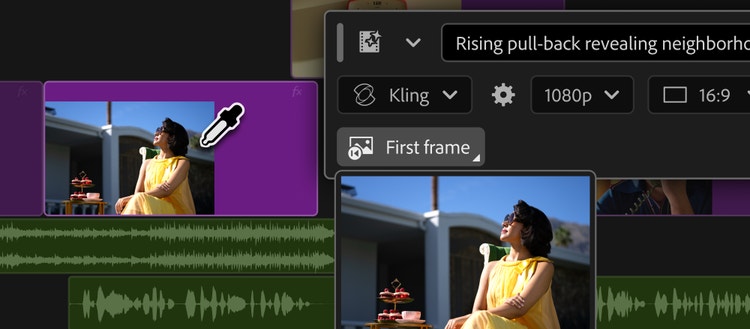
The Generative Media Tool is an AI feature built directly into Adobe Premiere. It allows editors to select an area of their timeline, describe the media they need with a text prompt, choose an available AI model, and generate content directly inside the project.
The generated results are added as editable clips, allowing the editor to continue refining the material in Premiere.
Adobe says the tool can use Adobe Firefly as well as supported partner models, including Google Veo, Kling, Runway, and Luma.
What Can Premiere Generate With AI?
AI-generated video
Editors can generate video clips to fill gaps in an existing sequence. Premiere can also use reference frames sampled from the project to help generated footage fit the surrounding visual context.
This can be useful when an editor needs a short transition, establishing shot, B-roll-style footage, or another visual element without searching through a stock library.
AI-generated sound effects
The Generative Media Tool can also create custom sound effects from text prompts.
For example, an editor could describe the type of sound needed for a scene and generate an effect directly in the timeline. Adobe also says voice input can be used to guide timing and intensity.
AI-generated soundscapes
Premiere also includes a Generate Soundscape feature in beta. It can analyze up to 15 seconds of video and create contextual layers of ambience and sound effects.
The result is intended as a starting point that editors can refine rather than a replacement for the entire audio-production process.
AI-generated music
Generate Music is also available in beta. Editors can create original music variations and adjust options such as tempo and looping.
Adobe says the generated music is commercially safe and includes synchronization rights across media.
How to Use Generative Media in Premiere
The basic workflow is designed to happen directly inside the editing timeline.
Step 1: Open your Premiere project
Open a project containing the sequence you want to edit.
Step 2: Select where the generated media should appear
Use the Generative Media Tool to select the section of the timeline where you want to create new media.
Step 3: Describe what you want
Enter a text prompt describing the video or sound effect you need. Be specific about the subject, action, environment, mood, or sound characteristics when those details matter.
Step 4: Select an AI model
Choose from the supported AI models available in your Premiere installation. Model availability and generation options can vary.
Step 5: Generate the result
Premiere processes the request and adds the generated media to your sequence as an editable clip.
Step 6: Refine the edit
Review the generated result and continue editing it alongside your original footage. If the result does not work, you can generate another version and compare the alternatives.
Why Generative Media Inside Premiere Matters
The main advantage is workflow efficiency.
Previously, an editor might need to leave Premiere, open an external AI video or sound-generation service, create the asset, download it, import it, and then position it in the timeline.
With Generative Media, the generation process happens where the editing is already taking place.
- Less switching between applications
- Faster creation of missing video elements
- AI-generated sound effects inside the timeline
- Editable generated clips
- Multiple supported AI models
- Reference frames for better visual context
New AI Audio Features in Premiere
The September 2026 release also introduces several AI-powered audio tools designed to simplify common editing problems.
Enhance Audio
Enhance Audio provides more control over dialogue, music, ambience, and sound effects within a clip. Adobe says the new system expands on its previous Enhance Speech technology.
Separate Crosstalk
Separate Crosstalk can separate overlapping speakers into independent tracks, making it easier to edit conversations where two people speak at the same time.
Dynamic Auto Ducking
Dynamic Auto Ducking automatically balances dialogue and other audio elements, reducing the need to manually create keyframes for every adjustment.
Adobe Premiere AI Assistant
Generative Media is not the only AI development in Premiere.
Adobe also offers an AI Assistant in beta that can help with repetitive editing tasks using natural-language instructions.
Instead of manually navigating multiple panels and menus, an editor can describe what they want the assistant to do.
Supported workflows include tasks such as organizing footage, renaming clips, adding markers, processing transcripts, and preparing an initial edit.
The goal is not to remove the editor from the process. Adobe describes the assistant as a way to handle technical and repetitive work while the editor remains responsible for creative decisions.
Premiere AI vs Using Separate AI Video Tools
| Workflow | Premiere Generative Media | Separate AI Tool |
|---|---|---|
| Generate video | Inside Premiere | Usually outside the editor |
| Use timeline context | Yes | Depends on the tool |
| Import generated media | Not required for the basic workflow | Often required |
| Continue editing immediately | Yes | Usually requires an import step |
Who Should Use Adobe Premiere's AI Features?
The new tools are most useful for people who already spend significant time editing video and regularly encounter repetitive production tasks.
- YouTube creators: Generate supporting footage and sound effects without leaving the editing environment.
- Social media creators: Produce short visual or audio elements more quickly.
- Video marketers: Fill timeline gaps and create supporting assets during production.
- Professional editors: Reduce repetitive preparation and audio-editing work.
- Motion designers: Use AI Assistant capabilities in After Effects for project organization and technical workflows.
What About After Effects?
Adobe is extending its AI workflow beyond Premiere.
After Effects now has an AI Assistant available in public beta. It can interpret natural-language instructions and help with tasks such as organizing projects, troubleshooting technical issues, creating expressions, and generating images or video.
The assistant can work across an entire project, which can be particularly useful for large motion-design projects containing many layers and compositions.
Is Adobe Premiere's AI Worth Using?
For editors who frequently need short pieces of B-roll, sound effects, music, or other supporting media, the new AI features can reduce the amount of time spent moving between applications.
The biggest advantage is integration. Instead of treating AI generation as a separate production stage, Premiere places generation directly alongside the editing process.
However, AI-generated footage and audio should still be reviewed carefully. Editors remain responsible for deciding whether generated material fits the story, visual style, technical requirements, and intended audience.
Final Verdict
Adobe Premiere's 2026 AI update makes generative media much more practical for everyday video editing.
The Generative Media Tool can create video and sound effects directly in the timeline, while new audio features address common production problems. AI Assistant capabilities also push Premiere toward a more agentic editing workflow.
For creators already using Premiere, these features are particularly interesting because they reduce the need to leave the editor whenever an additional visual or audio asset is needed.
The important shift is not simply that Premiere can generate AI content. It is that generation, editing, and refinement can happen within the same workflow.
FAQ
What is the Generative Media Tool in Adobe Premiere?
It is an AI-powered Premiere feature that lets editors generate video and sound effects directly inside the editing timeline using text prompts and supported AI models.
Can Adobe Premiere generate video with AI?
Yes. The Generative Media Tool can generate video clips from text prompts and can use reference frames from a project to help match the surrounding visual context.
Can Premiere generate sound effects?
Yes. Premiere's Generative Media Tool can generate custom sound effects directly in the timeline.
Does Premiere use only Adobe Firefly?
No. Adobe says the Generative Media Tool supports Adobe Firefly as well as selected partner models, including Google Veo, Kling, Runway, and Luma.
Is Premiere AI Assistant available?
Adobe's AI Assistant is available in beta and can help automate certain repetitive editing tasks using natural-language instructions.