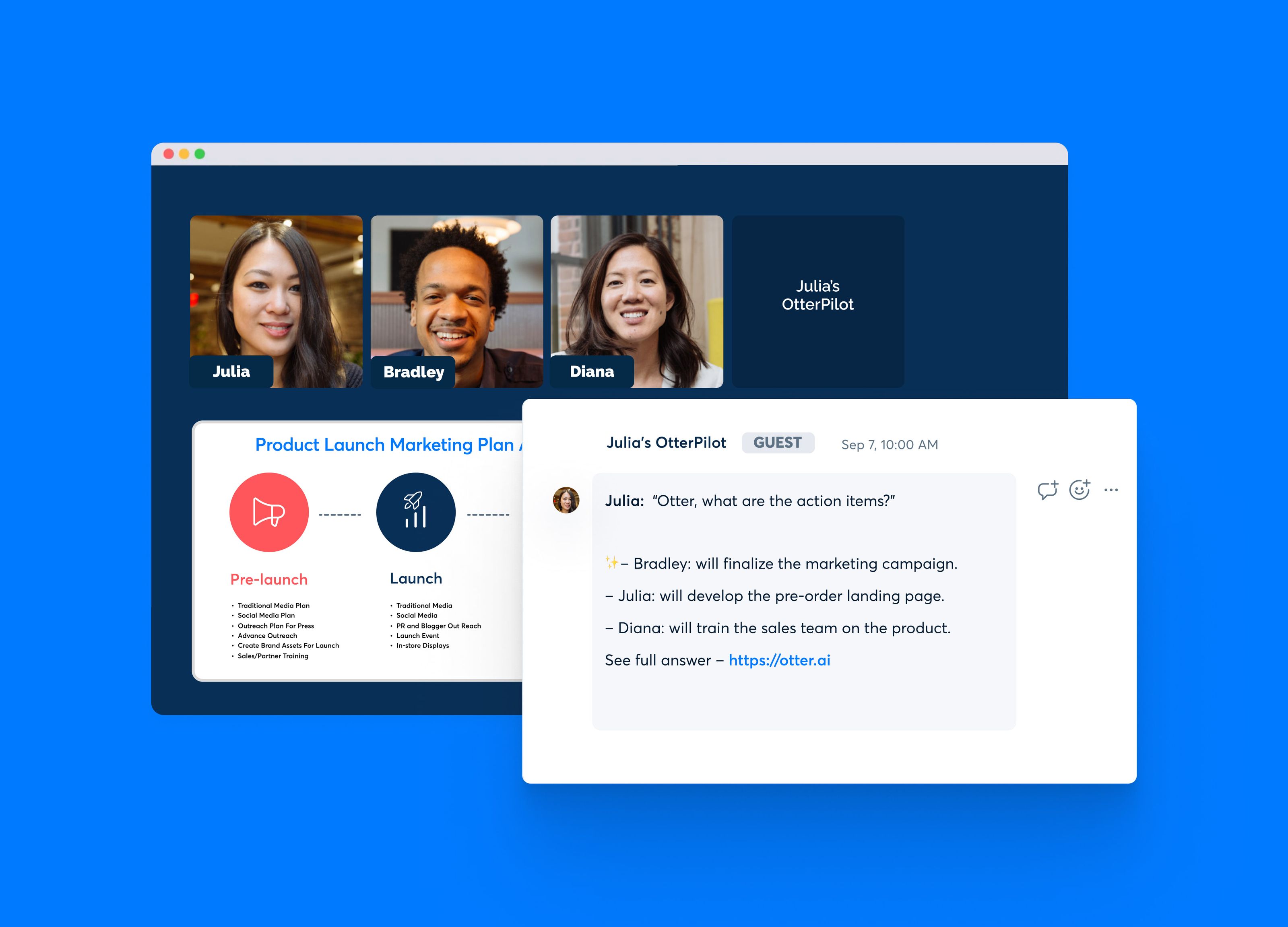
If you regularly attend Zoom calls, Google Meet sessions, or Microsoft Teams meetings, keeping track of everything that was said can become a full-time task. Otter AI is designed to reduce that workload by recording and transcribing conversations, generating summaries, identifying speakers, and helping users turn discussions into actionable notes.
In this Otter AI review, we look at what the platform does, how its AI meeting assistant works, its main features, pricing, practical use cases, advantages, limitations, and alternatives. The goal is to help individuals, students, professionals, creators, and small teams understand whether Otter fits their meeting and productivity workflow.
What Is Otter AI?
Otter AI is an AI-powered meeting assistant and transcription platform that converts spoken conversations into searchable digital notes. It can work with online meetings and recorded audio or video, allowing users to review conversations without relying entirely on manual note-taking.
One of its central features is real-time transcription. During supported meetings, Otter can capture spoken content and display the transcript while the conversation is taking place. It can also identify speakers, create summaries, highlight important information, and provide tools for reviewing the conversation afterward.
Otter supports major meeting platforms including Zoom, Microsoft Teams, and Google Meet. It also provides web, iOS, Android, and desktop access, making it useful for people who work across multiple devices.
Key Features of Otter AI
Real-Time Meeting Transcription
The core function of Otter AI is converting speech into text. Instead of manually writing down every important statement, users can follow a live transcript and return to the conversation later.
This can be particularly useful during interviews, team meetings, research sessions, lectures, sales calls, and project discussions where important details may be easy to miss.
AI Meeting Summaries
Otter can turn meeting conversations into more structured notes. Rather than reading an entire transcript from beginning to end, users can use generated summaries and takeaways to understand the major points discussed.
This workflow is useful when a meeting contains a large amount of information but only a small portion requires immediate attention.
Speaker Identification
Otter includes speaker identification, helping users distinguish between different people in a conversation. This makes transcripts easier to review, especially when several participants are involved.
Users can also edit conversation text, speaker information, and timestamps when corrections are necessary.
AI Chat
Another useful feature is Otter AI Chat. Instead of manually searching through a long transcript, users can ask questions about meeting content and use the available conversation information to find relevant answers.
For example, after a project meeting, a user might want to identify the agreed deadlines, action items, decisions, or unresolved questions without manually reviewing every line of the transcript.
Automated Slide Capture
Otter can also capture slides and shared visual material during supported virtual meetings. This helps preserve additional context alongside the transcript and meeting notes.
Searchable Conversation History
Meeting information becomes more useful when it can be found later. Otter provides tools for searching conversations by information such as keywords, speakers, and dates.
This can be valuable for teams that need to revisit previous decisions or locate a specific discussion without listening to an entire recording again.
Audio and Video File Transcription
Otter also supports importing recorded audio and video files for transcription. Supported file formats include common audio and video formats, allowing users to work with previously recorded conversations as well as live meetings.
How Otter AI Works
At a basic level, the workflow is straightforward:
- Sign up for an Otter account.
- Connect Otter with a supported calendar or meeting platform when appropriate.
- Allow Otter's meeting assistant to participate in supported meetings.
- Let Otter record and transcribe the conversation.
- Review the transcript, summary, and identified action items.
- Edit or organize the meeting information as needed.
- Share relevant notes with teammates or collaborators.
For recorded content, users can instead upload an eligible audio or video file and use Otter's transcription capabilities to convert the recording into searchable text.
How to Use Otter AI
Step 1: Create an Account
Start by creating an Otter account. The platform offers a free Basic plan, so users can explore the service without immediately purchasing a subscription.
Step 2: Connect Your Meeting Workflow
If you regularly use Zoom, Google Meet, or Microsoft Teams, connect Otter with the relevant meeting workflow. Calendar connections can help automate meeting participation for supported services.
Step 3: Start or Join a Meeting
Once configured, Otter can participate in supported online meetings and capture the conversation. During the meeting, users can follow the live transcript instead of trying to write down every statement manually.
Step 4: Review the Meeting Notes
After the meeting, review the generated transcript and summary. Pay particular attention to decisions, deadlines, questions, and action items.
Step 5: Organize and Share
Important conversations can be organized into folders and shared with other people depending on the permissions available to your plan and workspace.
Main Use Cases for Otter AI
Business Meetings
Teams can use Otter to document internal meetings, project updates, planning sessions, and discussions. Searchable notes can make it easier to revisit decisions after the meeting ends.
Sales Calls
Sales professionals can use AI-generated transcripts and summaries to review customer conversations. Important questions, objections, requirements, and follow-up tasks can be easier to identify when the discussion is documented.
Students and Education
Students can use transcription technology to create searchable records of eligible lectures, interviews, study sessions, or research discussions. However, students should always follow their school's rules regarding recording and AI tools.
Journalists and Interviewers
Interview-heavy workflows can involve hours of recorded material. Transcription and speaker identification can reduce the amount of time required to find specific portions of an interview.
Content Creators
Podcasters, YouTubers, writers, and other creators can use transcripts as a starting point for turning conversations into articles, summaries, clips, social media ideas, or other content formats.
Remote Teams
Remote teams often communicate across different schedules and time zones. Detailed meeting records can help people who could not attend understand what was discussed and what needs to happen next.
Pros and Cons of Otter AI
Pros
- Real-time transcription for supported meetings.
- Works with major platforms such as Zoom, Google Meet, and Microsoft Teams.
- AI-generated meeting summaries and takeaways.
- Speaker identification helps organize multi-person conversations.
- AI Chat can make meeting information easier to query.
- Supports audio and video file imports.
- Available across web and mobile platforms.
- Free Basic plan available for users who want to test the service.
Cons
- The free plan has monthly transcription limits.
- Longer meetings and heavier usage may require a paid plan.
- Some advanced team, administration, and workflow capabilities are reserved for higher plans.
- AI-generated transcripts and summaries should still be reviewed for accuracy.
- Recording meetings may require permission or compliance with applicable laws and organizational policies.
Otter AI Pricing
Otter currently offers multiple subscription levels, including a free Basic plan and paid Pro, Business, and Enterprise options.
The Basic plan includes features such as real-time transcription, AI Chat, speaker identification, mobile apps, and 300 monthly transcription minutes. It also includes three lifetime audio or video file imports according to Otter's current pricing information.
The Pro plan provides higher usage limits and additional capabilities. Otter's current pricing page lists Pro at $16.99 per user per month on monthly billing, with a lower effective price available when billed annually.
For larger teams, the Business plan provides expanded meeting capacity, administration features, usage analytics, and additional workspace capabilities. Enterprise plans are custom-priced and are designed for organizations that need additional security, controls, integrations, and support.
Pricing and plan features can change, so users should verify the current pricing directly with Otter before subscribing.
Who Should Use Otter AI?
Otter AI can be useful for people who spend significant amounts of time in meetings or work with recorded conversations.
It may be particularly relevant for:
- Business professionals who attend frequent meetings.
- Small teams that need searchable meeting records.
- Sales representatives reviewing customer conversations.
- Project managers tracking decisions and action items.
- Students working with permitted recorded lectures or discussions.
- Researchers and interviewers handling large amounts of spoken content.
- Content creators who want searchable transcripts.
- Remote workers who need to catch up on meetings they missed.
Otter AI Alternatives
Otter is not the only AI meeting assistant available. Depending on your workflow, several alternatives may be worth researching.
Fathom
Fathom focuses on recording, transcribing, and summarizing online meetings. It can be relevant for users who want an AI meeting assistant centered around conversation summaries and meeting intelligence.
Fireflies.ai
Fireflies.ai is another meeting transcription and conversation intelligence platform. It is designed for teams that want to capture conversations and connect meeting information with broader productivity workflows.
Granola
Granola takes a different approach by functioning as an AI notepad that works with meeting audio while allowing users to contribute their own notes. This can appeal to people who prefer combining personal notes with AI-generated meeting information.
The best option depends on factors such as meeting platforms, transcription requirements, integrations, privacy preferences, team size, and budget.
Frequently Asked Questions
Is Otter AI free?
Yes. Otter offers a free Basic plan. The current Basic tier includes 300 transcription minutes per month along with other usage limits. Paid plans provide higher limits and additional features.
Does Otter AI work with Zoom?
Yes. Otter supports Zoom and can use its meeting assistant to record and transcribe supported meetings.
Does Otter AI work with Google Meet?
Yes. Google Meet is one of the supported meeting platforms for Otter's meeting assistant.
Does Otter AI work with Microsoft Teams?
Yes. Otter also supports Microsoft Teams for its meeting transcription workflow.
Can Otter AI transcribe uploaded recordings?
Yes. Otter supports importing audio and video files for transcription, subject to the limits of the user's subscription plan.
Can Otter AI summarize meetings?
Yes. Automated meeting summaries and takeaways are among Otter's core AI capabilities.
Can Otter AI identify speakers?
Yes. Speaker identification is available, helping users distinguish different participants within a conversation.
Is Otter AI useful for small businesses?
It can be useful for small businesses that conduct frequent meetings and want searchable transcripts, summaries, and action items. The appropriate plan depends on meeting volume and the features the team needs.
Should I trust an AI transcript without checking it?
No AI transcription system should be treated as infallible. Important names, numbers, technical terms, decisions, and action items should be reviewed before they are used for important business, academic, legal, or operational purposes.
Final Verdict
Otter AI is a practical AI meeting assistant for people who want to spend less time manually documenting conversations. Its combination of real-time transcription, speaker identification, automated summaries, AI Chat, searchable meeting history, and support for major video meeting platforms makes it useful across business, education, sales, research, and content workflows.
The free Basic plan provides a way to test the core experience, while paid plans increase usage limits and add more advanced features for individuals and teams. The main consideration is whether Otter's transcription limits, integrations, privacy requirements, and pricing structure fit your specific workflow.
For anyone researching AI meeting assistants in 2026, Otter AI is worth understanding as part of the broader market of tools designed to turn conversations into organized, searchable, and actionable information.