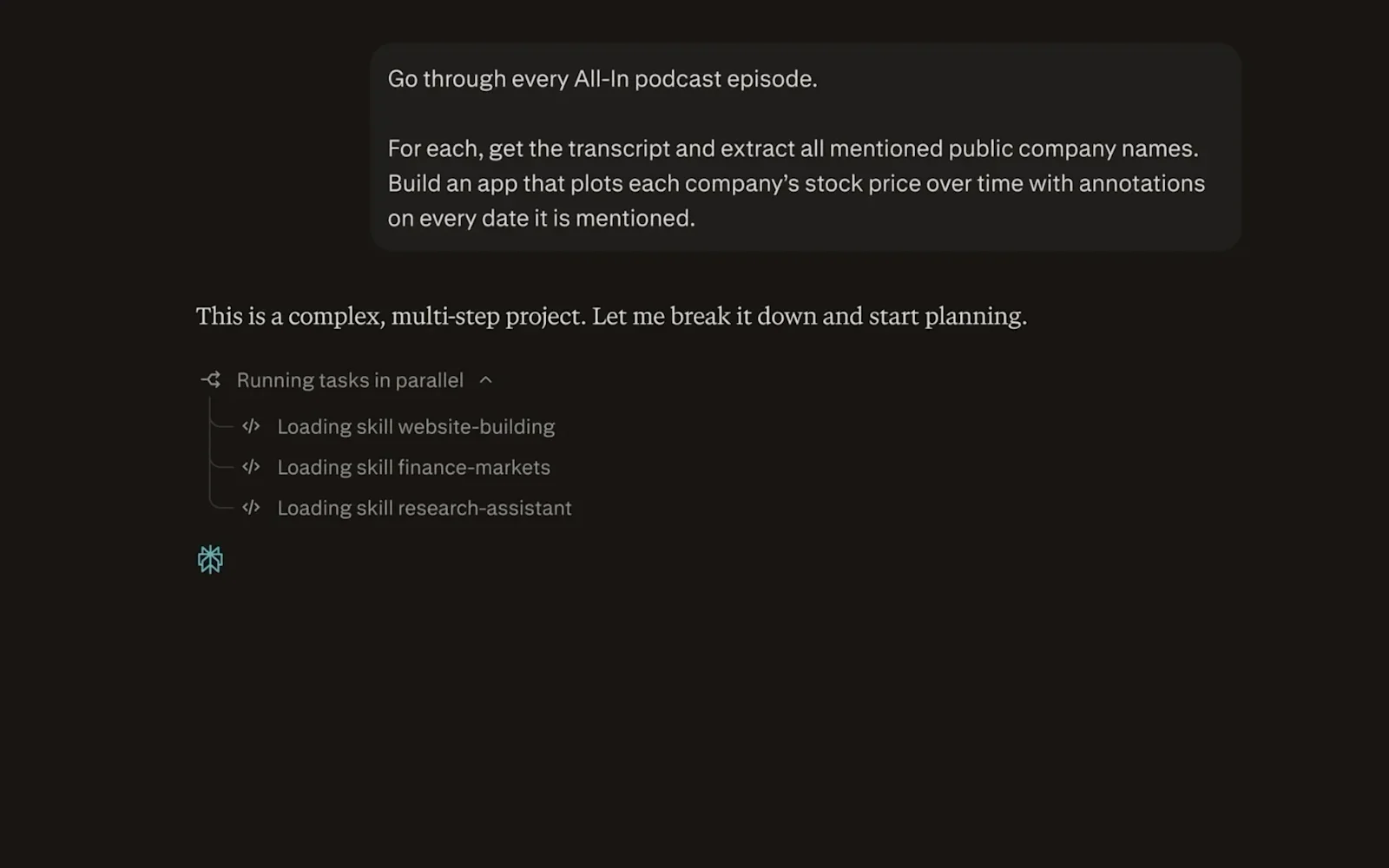
AI assistants are moving beyond simple question-and-answer tasks. Instead of only generating text, newer AI tools can research information, browse websites, work with connected applications, analyze data, and complete multi-step workflows. Perplexity Computer is built around this more agentic approach.
Perplexity describes Computer as a general-purpose digital worker that can research, browse, code, build, monitor, create, edit, connect to tools, and automate workflows. It can take a natural-language instruction, break the work into steps, use specialized capabilities, and continue working while the user guides or reviews the process.
This Perplexity Computer review explains what the tool is, how it works, its main features, pricing, practical use cases, limitations, and who may find it useful.
What Is Perplexity Computer?
Perplexity Computer is an AI-powered digital worker designed to handle multi-step tasks rather than simply return a conversational answer.
The basic idea is straightforward: you describe the outcome you want in natural language, and Computer determines how to carry out the workflow. Perplexity says Computer can deploy subagents, browse the web, conduct research, create files and applications, connect to external tools, and continue working through complex projects.
This makes Computer different from a traditional AI chatbot. A normal chatbot might explain how to create a report. An agentic system can be instructed to research the subject, analyze information, create the report, and produce a finished deliverable.
Perplexity has also positioned Computer for longer-running work. Its product page says workflows can run for hours or even months, while recurring tasks and continuous monitoring are supported for suitable use cases.
Key Features of Perplexity Computer
1. Multi-Step AI Workflows
The main feature is the ability to handle a project as a workflow rather than treating every request as an isolated question.
You can provide a high-level objective and let Computer determine the steps required to complete it. This can be useful when a task involves research, browsing, analysis, document creation, and several other operations.
For example, instead of asking for individual pieces of a market report, you could describe the complete report you want and let Computer organize the research and production process.
2. Parallel Research and Browser Automation
Perplexity Computer can combine web research with browser automation. According to Perplexity, Computer can search the web, automate browser actions, extract information, and synthesize the results within a single workflow.
This is particularly useful for research-heavy tasks where information needs to be gathered from multiple websites before a useful result can be produced.
3. Multiple AI Models
Perplexity Computer is designed around access to multiple advanced AI models rather than relying on only one model for every task. Perplexity says Computer can route work across more than 20 specialized models.
The practical benefit is that different parts of a project can be handled by capabilities suited to different types of work, such as research, coding, analysis, or content creation.
4. Connectors and External Tools
Computer can connect with external applications and data sources. Perplexity currently describes support for hundreds of connectors, including tools such as Gmail, Slack, Notion, and Calendar.
For business users, this can make Computer more useful because the AI can work with information that exists outside the chat interface.
5. Recurring and Background Tasks
Perplexity Computer supports recurring tasks and continuous monitoring for workflows that need to run repeatedly.
This can be useful for activities such as monitoring information, producing recurring reports, or checking a data source on a schedule. Instead of manually starting the same workflow every time, a suitable task can be configured to run repeatedly.
6. Create Apps, Reports, and Other Deliverables
Computer is not limited to text responses. Perplexity says it can create production-ready applications, websites, reports, and other work products.
For example, a user could provide raw business data and ask Computer to analyze trends, create charts, prepare an executive summary, and format the results as a presentation.
How Perplexity Computer Works
The workflow is built around natural-language instructions.
- Describe the objective. Tell Computer what you want to accomplish and provide relevant context.
- Computer plans the work. The system can break a complex objective into smaller tasks and determine which capabilities are needed.
- Computer performs the work. It can research, browse websites, analyze information, use connected tools, and create outputs.
- Review the result. You can inspect the work and provide additional instructions when changes are required.
- Continue or automate. Suitable workflows can be refined, repeated, or scheduled for ongoing work.
The important distinction is that Computer is designed to execute a workflow, not simply explain how the workflow could be performed.
How to Use Perplexity Computer
Using Computer does not require programming knowledge. The quality of the result, however, depends heavily on how clearly the task is described.
Step 1: Start With a Specific Goal
Instead of writing a vague request such as “research my competitors,” describe the desired outcome.
A stronger instruction might be:
“Research five major competitors in the U.S. project management software market, compare their pricing and core features, identify recent product updates, and create a concise comparison report.”
The second request gives Computer a clearer objective, scope, geography, and expected deliverable.
Step 2: Provide Context
Include important information such as the target audience, timeframe, geographic market, preferred format, or source requirements.
For business workflows, specify which connected applications or data sources should be used when appropriate.
Step 3: Let Computer Execute the Workflow
Computer can perform the research and other tasks required by the instruction. For complex projects, it may work through multiple stages instead of producing everything immediately.
Step 4: Review and Refine
Agentic AI systems can make mistakes, misunderstand requirements, or produce results that need refinement. Review important outputs and give additional instructions when necessary.
For business-critical or sensitive workflows, human review remains important.
Main Use Cases for Perplexity Computer
Research and Competitive Analysis
Researchers and business professionals can use Computer to gather information from multiple sources, compare companies, analyze market information, and organize findings into a structured deliverable.
Business Reporting
Computer can help transform raw information into reports, summaries, charts, and presentations. This can reduce the amount of repetitive work involved in preparing recurring business documents.
Data Analysis
Users can provide structured data and ask Computer to identify trends, summarize findings, and turn the results into a more understandable format.
Content and Document Creation
Computer can assist with research-backed documents, reports, presentations, websites, and other content projects where several steps are required before the final output is ready.
Software and Website Projects
Perplexity positions Computer as capable of building applications and websites. This makes it relevant to developers, founders, and small teams that want an AI system to assist with more than isolated coding questions.
Workflow Automation
Recurring tasks and connected applications make Computer relevant for automation workflows. A business could use it for recurring information collection, reporting, monitoring, or other repetitive processes.
Perplexity Computer Pros and Cons
Pros
- Handles multi-step workflows instead of only answering individual questions.
- Combines research and action in a single workflow.
- Supports browser automation for suitable web-based tasks.
- Works with connected applications and external data sources.
- Can create useful deliverables such as reports, websites, and applications.
- Supports recurring workflows for ongoing tasks.
- Uses multiple AI models for different types of work.
Cons
- Computer access is not included with the free plan.
- Advanced usage can become expensive for individuals with heavy workloads.
- Complex agentic workflows still require supervision.
- Connected applications can introduce privacy considerations because the system may work with information from external services.
- AI-generated work should still be reviewed before it is used for important business, financial, legal, or operational decisions.
Perplexity Computer Pricing
Perplexity currently offers several individual plans. The free plan is listed at $0 per month, while Pro is listed at $20 per month and Max at $200 per month. Pricing and plan benefits can change, so readers should verify the current pricing before subscribing.
| Plan | Listed Price | Computer Access | Notable Details |
|---|---|---|---|
| Free | $0/month | No | Limited usage and basic access |
| Pro | $20/month | Yes | Expanded Computer access and 4,000 bonus credits |
| Max | $200/month | Yes | Higher Computer usage, 10,000 monthly credits, and 35,000 bonus credits |
Perplexity's current product information also states that Computer is available to Pro and Max subscribers across desktop, mobile, Slack, and Microsoft 365. Availability and feature limits can vary by plan and may change over time.
Who Should Use Perplexity Computer?
Perplexity Computer may be useful for professionals who regularly perform multi-step knowledge work.
Potential users include:
- Small-business owners
- Researchers
- Marketing professionals
- Content creators
- Developers and technical teams
- Consultants
- Analysts
- Founders and small startup teams
- Professionals who manage repetitive research workflows
It may be less useful for someone who only needs quick answers, simple writing assistance, or occasional web searches. In those cases, a conventional AI assistant may already provide everything needed without the additional cost or complexity of an agentic workflow.
Perplexity Computer Alternatives
There are several AI products that address overlapping needs, although their workflows and capabilities differ.
ChatGPT Work
ChatGPT Work is designed for longer, multi-step tasks and finished deliverables. It is particularly relevant for users who want an AI system to work across files, applications, research, and other work processes.
Claude
Claude is another general-purpose AI assistant with capabilities spanning writing, research, coding, and computer interaction. Its suitability depends on the type of workflow, integrations, and plan requirements involved.
The important point when comparing these tools is to look beyond chatbot response quality. Consider whether you need browser automation, connected applications, recurring tasks, file handling, coding, research, or finished deliverables.
Is Perplexity Computer Worth Using?
Perplexity Computer represents a shift from AI that primarily answers questions toward AI that can participate in complete workflows.
Its strongest use cases are tasks where several activities need to happen together: researching information, browsing websites, analyzing data, connecting applications, creating deliverables, and repeating the process over time.
The value depends on how much of that work you actually perform. Someone who frequently handles research-heavy or repetitive workflows may benefit more than someone who mainly uses AI for simple questions and writing.
Another consideration is supervision. Agentic systems can perform more actions than conventional chatbots, which means mistakes and incorrect assumptions can have more significant consequences. Important outputs should therefore be reviewed before they are used or shared.
Frequently Asked Questions About Perplexity Computer
What is Perplexity Computer?
Perplexity Computer is an AI-powered digital worker designed to perform multi-step tasks involving research, browsing, coding, creation, connected applications, automation, and other workflows.
Is Perplexity Computer free?
No. Perplexity's current pricing page lists a free plan, but Computer access is included with paid plans such as Pro and Max rather than the free plan.
How much does Perplexity Computer cost?
The current individual pricing page lists Pro at $20 per month and Max at $200 per month. The free plan is listed at $0 per month but does not include Computer access. Pricing may change.
Can Perplexity Computer automate tasks?
Yes. Perplexity describes recurring tasks and continuous monitoring as features of Computer. It can also automate suitable browser workflows and work with connected applications.
Can Perplexity Computer browse the web?
Yes. Web research and browser automation are core parts of the Computer workflow. It can search websites, extract information, and use browser actions as part of multi-step tasks.
Can Perplexity Computer create websites?
Yes. Perplexity states that Computer can create production-ready apps, websites, reports, and other deliverables.
Does Perplexity Computer use multiple AI models?
Yes. Perplexity says Computer can route work across more than 20 specialized models, allowing different parts of a workflow to use different AI capabilities.
Is Perplexity Computer good for business?
Computer is designed for many business-oriented workflows, including research, reporting, data analysis, connected applications, automation, and recurring tasks. Businesses should still evaluate privacy, permissions, accuracy, and administrative requirements before connecting sensitive systems.
Final Verdict
Perplexity Computer is an AI productivity and automation platform focused on completing multi-step work rather than simply generating conversational answers.
Its combination of web research, browser automation, multiple AI models, connectors, recurring tasks, and deliverable creation makes it relevant to professionals who want to delegate substantial workflows to AI.
The main trade-off is that more capable agentic workflows also require more oversight. Users should provide clear instructions, limit access to information that is not necessary for a task, and review important results before taking consequential action.
For users who regularly perform research, analysis, automation, content production, software projects, or other multi-step knowledge work, Perplexity Computer is a tool worth understanding as the AI software landscape continues moving toward autonomous workflow execution.